
Cheques
Cheques
ClearBank accounts can support cheque deposits. If you'd like access to this product, please speak to your relationship manager.
You can submit cheques using the POST /payments/cheques/v1/submit-deposit-async endpoint.
The message flow for cheques submitted via the synchronous endpoint is shown here.
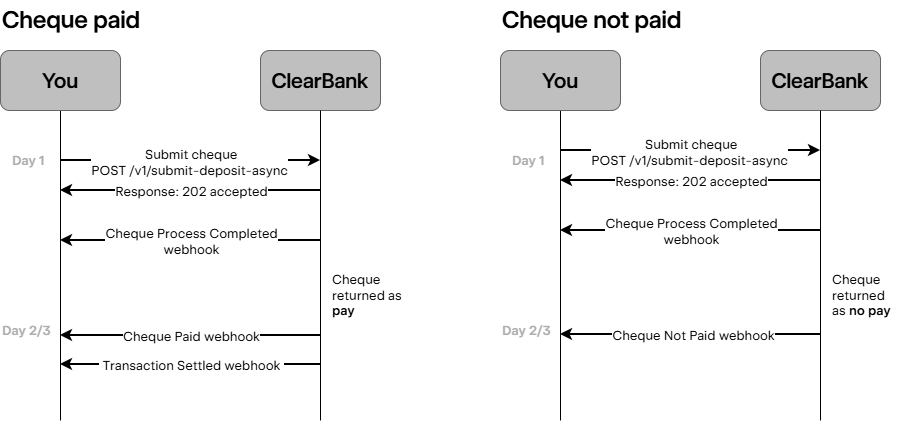
You can submit a cheque image in TIFF file format. ClearBank will return 202 Accepted once the request is accepted.
The successful or unsuccessful cheque submission is returned through the Cheque Process Completed webhook.
Cheques can be submitted any time and may take up to three working days to process. If the cheque passes processing, is submitted to the ICS scheme, and approved for payment, you will receive the Cheque Paid and Transaction Settled webhooks. If the cheque cannot be processed automatically, you will receive the Cheque Reconciled and Transaction Settled webhooks.
Scenarios where the cheque wouldn't process successfully include:
- If the cheque is over the limits you defined during onboarding, you will receive a 400 response when you submit the cheque.
- If a cheque cannot be submitted to the ICS scheme, for example, due to low image quality, you will receive a 400 response when you submit the cheque.
- If the cheque is successfully submitted, but there is missing information, you will receive the transaction rejected report from ClearBank through our ticketing system.
- If a decision is made by the issuing bank through ICS to not pay the cheque, you will receive the Cheque Not Paid webhook.
Image requirements
For cheque images to successfully validate, they must satisfy the following requirements:
| File type | Encoding | Resolution | Image size in Base64 length | Image size in bytes |
|---|---|---|---|---|
| Bitonal TIFF | Base64 encoded string | 200 DPI | 90,000 characters | 67,500 bytes |
Cheque images must be:
- Clear
- Uncrumpled
- Without folded corners and have visible edges
- Free from shadows